The guest sits down, but the waiter is at another table.
They scan the code, browse the menu with photos and choose while they wait.
ISKA MenuYour choice has been saved.
We respect your privacy
Three are optional: statistics, how you reached us and ad measurement. If you decline, the site works fully. We use cookies and similar technologies to make the site work. We keep your choice; change it from “Cookies” below.
We couldn't save your choice in your browser. Until we can, we use only the necessary cookies.
ISKA Menu shows the menu with photos on the guest's phone. ISKA Restaurant · Pro carries on from there: the guest orders from the QR code on the table, the order reaches the team, and “Call a waiter” and “I'd like the bill” are on the same screen.
The guest sits down, but the waiter is at another table.
They scan the code, browse the menu with photos and choose while they wait.
ISKA MenuThe guest is ready to order but is waiting for someone to notice them.
With a QR code on every table, they order by themselves and the order reaches the team with a notification; “I'd like the bill” is on the same screen.
ISKA RestaurantThe guest wants more water, but the waiter is at the other end of the dining room.
“Call a waiter” sends a notification to the team, with no need to shout across the dining room — when it is switched on for the menu.
ISKA RestaurantA customer wants to pick up their dinner on the way.
They order from their phone, and the team receives it like any other order.
ISKA RestaurantThe paper menu is taken away with the empty plates and, to see the desserts again, the guest has to catch someone's eye, wait and ask. The menu on the phone is still open, and the photos make a second look tempting. With a QR code on every table, the guest sends the order themselves, the team receives it with a notification, and the waiter serves instead of going round the tables. Orders, calling a waiter and the bill are in ISKA Restaurant · Pro; ISKA Menu shows the menu and does not take orders.
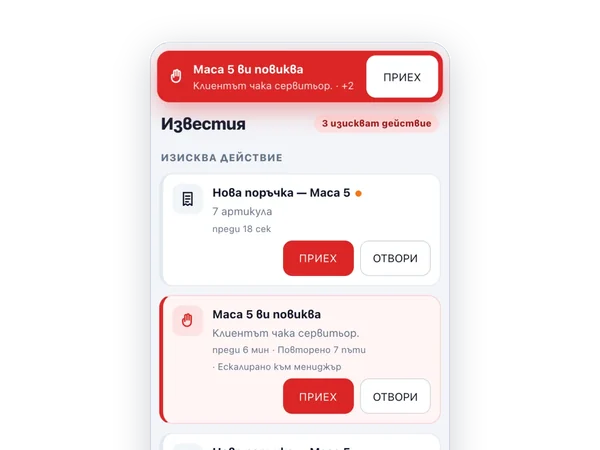
A QR code on every table, orders from the guest's phone to the kitchen, “Call a waiter” and “I'd like the bill”, takeaway orders and table reservations — with notifications for the team.
Learn morePhotos of the dishes, a lunch menu that you change every day, and up to four languages (Plus). The guest chooses at their own pace on their phone and does not have to call anyone over to see the menu again. The menu displays; orders are taken in ISKA Restaurant · Pro.
Learn moreNo. ISKA Menu shows the menu. Orders from the table and for takeaway, calling a waiter and the bill are in ISKA Restaurant · Pro.
No. The guest opens the menu and orders in the browser on their phone — from the QR code or from the link — and the page stays open. They can go back to the desserts without calling anyone.
No. The order reaches the team sooner, and the service stays human.
Tell us how many tables you have and how your dining room works. You can start ISKA Menu for free.